IceLaborVPN
Secure Zero-Trust Remote Access Gateway for Malware Analysis Labs - DORA/MITRE Compliant
Secure Zero-Trust Remote Access Gateway for Malware Analysis Labs



Overview
IceLaborVPN provides secure, browser-based remote access to isolated malware analysis infrastructure without requiring client software installation. Designed for regulated environments (DORA, ISO 27001), it implements defense-in-depth security with comprehensive audit logging.
Key Features
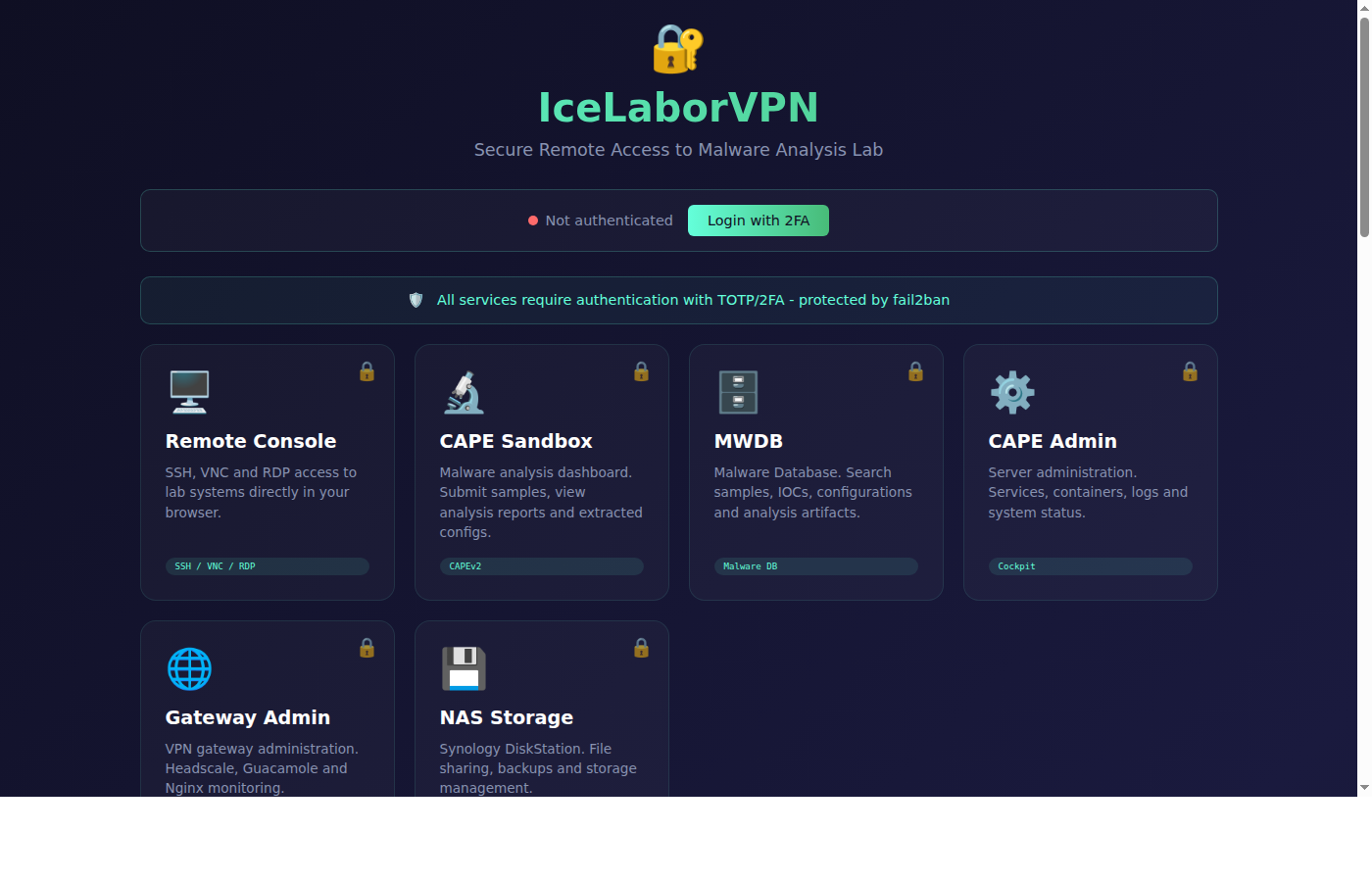
- Zero-Trust Architecture - WireGuard VPN mesh with Headscale control plane
- HTML5 Remote Access - SSH, VNC, RDP via browser (Apache Guacamole)
- Multi-Factor Authentication - TOTP/2FA mandatory for all users
- Session Recording - Full audit trail for compliance
- Progressive Brute-Force Protection - Multi-layer defense with escalating ban times (5 min → 15 min → 60 min)
- Threat Intelligence Blocklists - Proactive blocking via 6 OSINT feeds (Spamhaus, Tor, Emerging Threats, Blocklist.de, AbuseIPDB)
- AbuseIPDB Integration - All 11 fail2ban jails report malicious IPs to community threat intelligence
- Fail2ban Web Dashboard - View and manage bans directly from the portal (after login)
- Tailscale Network Dashboard - Live node status with online/offline indicators
- Deployment Checklist - Interactive deployment tracker with progress bar and audit trail
- Real-time Alerts - Pushover notifications with anti-flood deduplication and per-jail reason messages
- Scanner Detection - Automatic detection and banning of nmap/vulnerability scanners
- Attack Detection - Directory traversal, sensitive file probes, PHP/admin probes, RCE attempts auto-banned
- DORA/MITRE Compliant - Comprehensive documentation for regulators
Screenshots
Login Portal
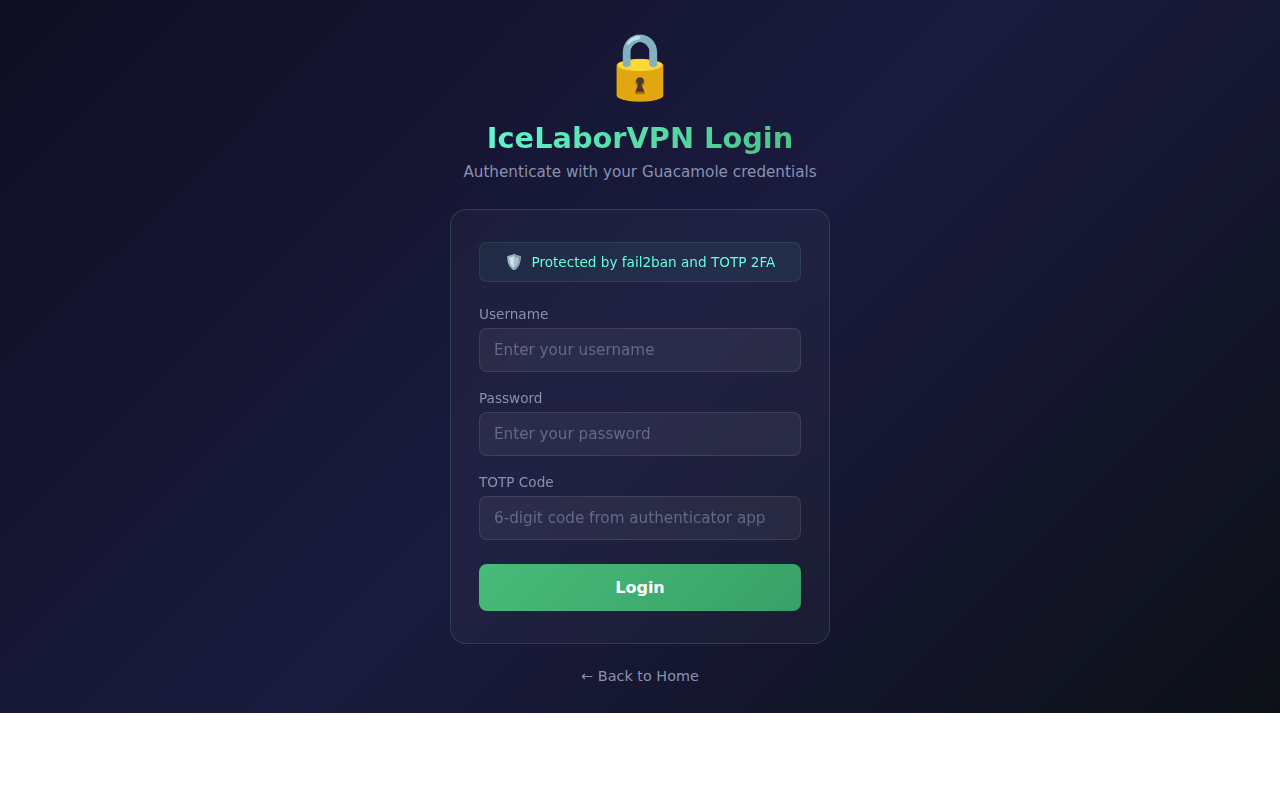 Secure login with TOTP/2FA authentication
Dashboard
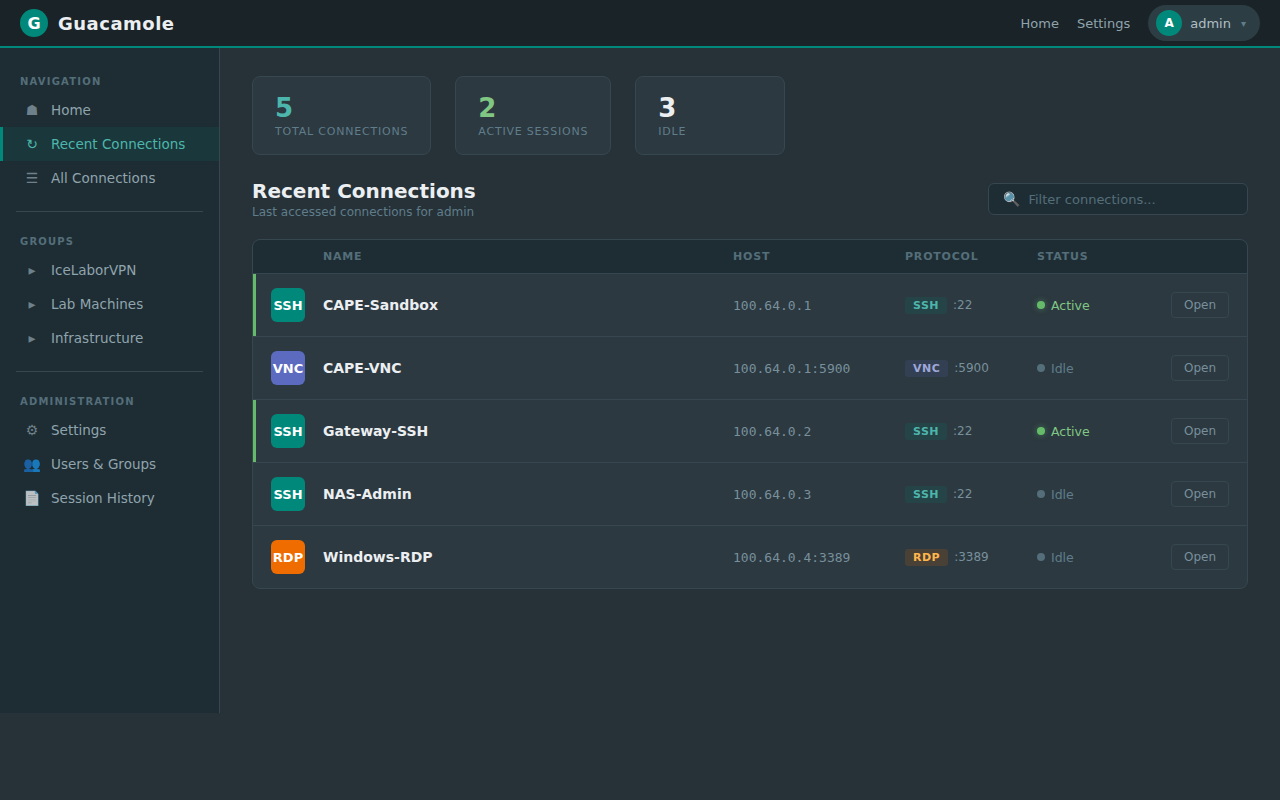 Connection overview with quick access to lab systems
SSH Session
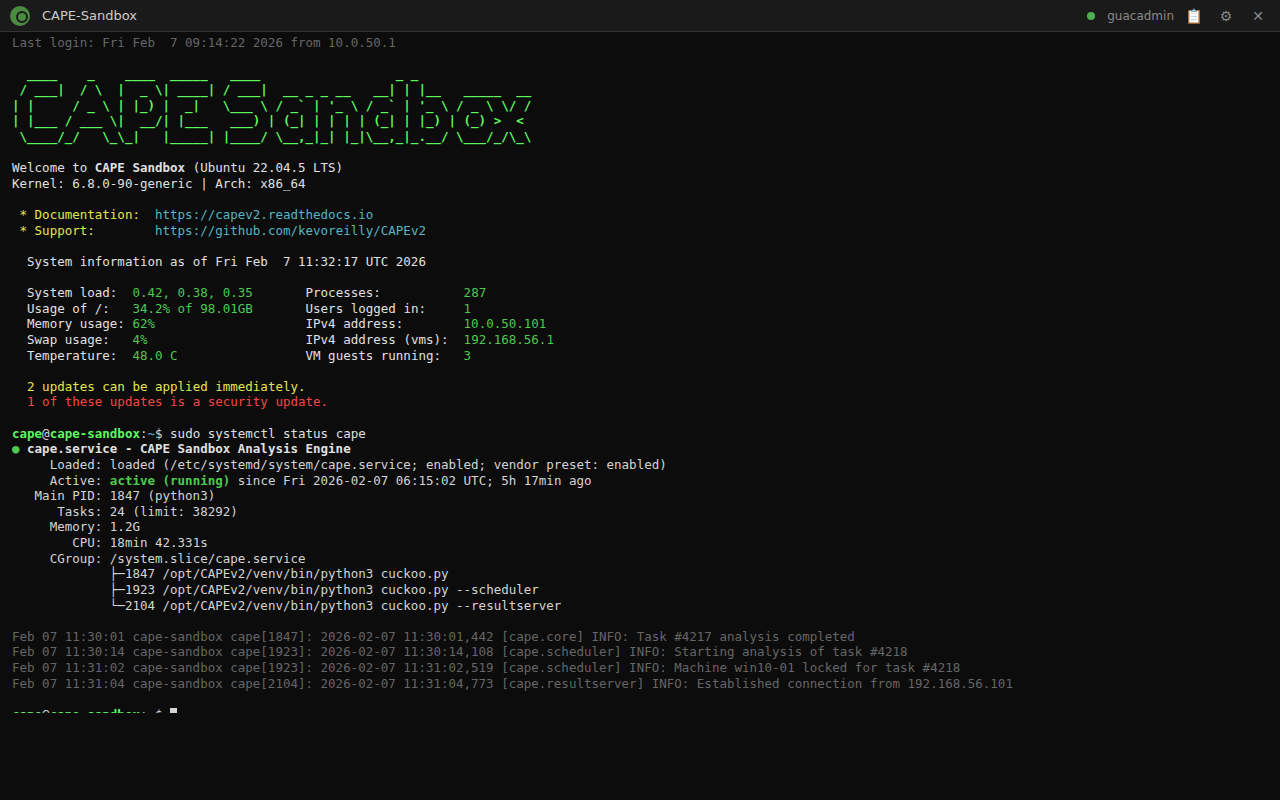 HTML5 SSH terminal with session recording
Security Alerts
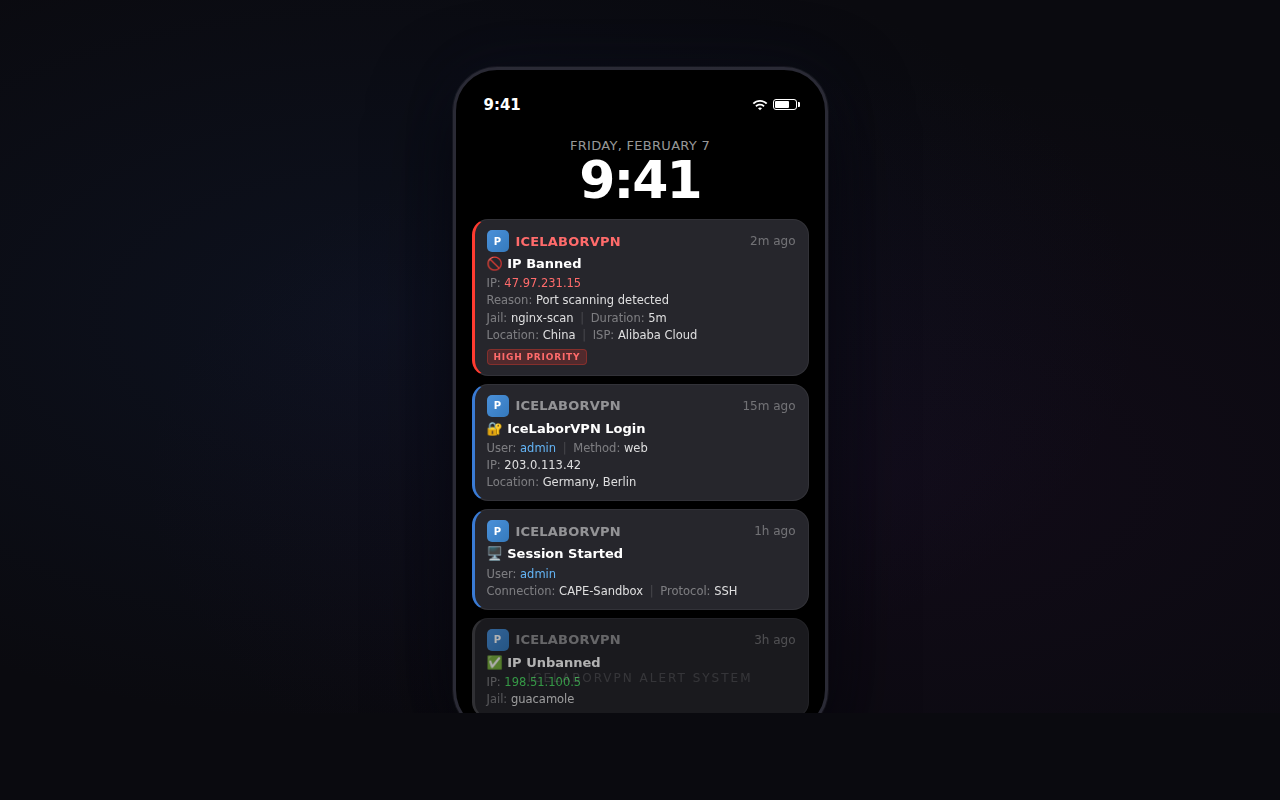 Real-time security notifications via Pushover
Architecture
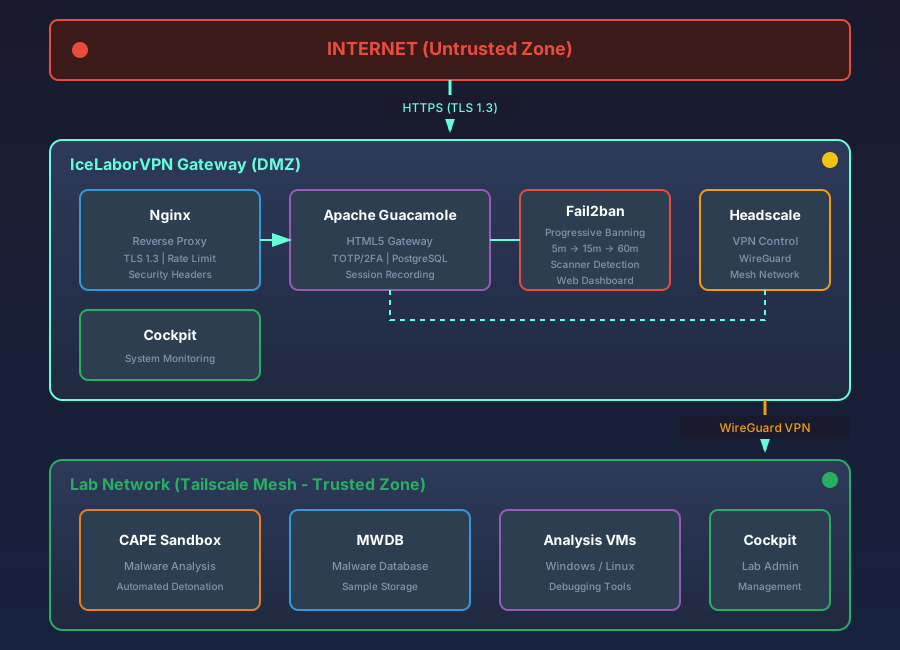
Zero-Trust Architecture with WireGuard VPN mesh and HTML5 Remote Access
Quick Start
Prerequisites
- Ubuntu 22.04 LTS or Debian 12
- Public IPv4 address
- DNS A record pointing to your server
- Pushover account (for notifications)
Installation
# Clone repository
git clone https://github.com/icepaule/IceLaborVPN.git
cd IceLaborVPN

# Configure environment
cp .env.example .env
nano .env  # Fill in all values!

# Run installer
chmod +x scripts/install.sh
sudo ./scripts/install.sh
First Login
- Navigate to
https://your-domain.com/guacamole/ - Login with configured admin credentials
- Scan QR code with authenticator app (Google/Microsoft Authenticator)
- Enter 6-digit TOTP code
- Access your lab systems!
Configuration
Environment Variables
| Variable | Description | Required |
|---|---|---|
HEADSCALE_DOMAIN | Your public domain | Yes |
GUAC_ADMIN_PASSWORD | Admin password (min. 12 chars) | Yes |
GUAC_DB_PASSWORD | Database password | Yes |
PUSHOVER_APP_TOKEN | Pushover application token | Yes |
PUSHOVER_USER_KEY | Pushover user key | Yes |
ABUSEIPDB_API_KEY | AbuseIPDB API key for reporting + blocklist | Yes |
SSL_EMAIL | Email for Let’s Encrypt | Yes |
See .env.example for all options.
Adding Connections
Edit /opt/guacamole/db-init/02-admin-user.sql or use the Guacamole web interface:
- Login as admin
- Settings → Connections → New Connection
- Configure SSH/VNC/RDP parameters
- Assign to users/groups
Adding Tailscale Nodes
# On the gateway
/opt/IceLaborVPN/scripts/headscale-onboard.sh --generate-key

# On the new node
sudo tailscale up --login-server https://your-domain.com \
    --authkey <generated-key>
Automated Endpoint Deployment
For enterprise deployments via ManageEngine Endpoint Central or similar MDM solutions:
# Deploy scripts are in the deployment/ directory
ls deployment/

# Windows (PowerShell, run as SYSTEM)
deploy-tailscale-windows.ps1

# Linux (Bash, run as root)
deploy-tailscale-linux.sh

# macOS (Bash, run as root)
deploy-tailscale-macos.sh
See deployment/README.md for configuration instructions.
Guacamole Auto-Sync
Automatically create Guacamole connections for all Headscale nodes:
# Install the sync script
sudo cp deployment/headscale-guacamole-sync.py /opt/guacamole/
sudo chmod +x /opt/guacamole/headscale-guacamole-sync.py

# Run manually
sudo python3 /opt/guacamole/headscale-guacamole-sync.py

# Or set up cron (every 5 minutes)
echo '*/5 * * * * root /usr/bin/python3 /opt/guacamole/headscale-guacamole-sync.py >> /var/log/headscale-sync.log 2>&1' | sudo tee /etc/cron.d/headscale-sync
The script scans all online nodes for SSH (22), RDP (3389), VNC (5900) and manages Guacamole connections automatically.
Security Features
Authentication Stack
| Layer | Protection |
|---|---|
| Threat Intelligence Blocklists | Proactive blocking of ~30,000+ known malicious IPs via OSINT feeds |
| AbuseIPDB Reporting | All bans reported to community threat intelligence network |
| TLS 1.3 | Transport encryption |
| nginx Rate Limiting | 5 logins/min, 30 req/sec |
| Guacamole Brute-Force | 5 attempts → 5 min ban |
| Fail2ban (11 Jails) | Progressive banning: 5 min → 15 min → 60 min → 1 week (recidive) |
| Scanner Detection | nmap/vuln scanner auto-ban on all ports |
| Credential Harvesting Detection | .env/.git probing → instant ban (15 min → 1h → 24h) |
| Directory Traversal Detection | ../, %2e%2e, /etc/passwd → instant 1h ban |
| Sensitive File Probe Detection | .env, .git/, wp-config, credentials → instant 1h ban |
| PHP/Admin Panel Detection | .php, phpmyadmin, /admin/ → 2 attempts → 1h ban |
| RCE/Shell Injection Detection | cgi-bin, Log4Shell/JNDI, scanner user-agents → instant 1h ban |
| TOTP/2FA | Mandatory second factor |
| Session Timeout | 60 minutes inactivity |
Fail2ban Web Dashboard
After logging in, the portal displays a live Fail2ban status panel:
- Overview - Currently banned IPs, active jails, total failed attempts
- Per-Jail Details - Expandable list of banned IPs per jail
- Management - Unban or re-ban IPs directly from the browser
- Progressive Banning - Repeat offenders get escalating ban times (5 min → 15 min → 60 min)
Tailscale Network Dashboard
Live view of all Headscale/Tailscale nodes:
- Node Status - Online/offline indicators with last-seen timestamps
- Network Overview - Total, online, and offline node counts
- Auto-Refresh - Manual refresh button to update status
Deployment Checklist
Interactive deployment tracker for multi-step infrastructure rollouts:
- Phases & Groups - Steps organized by deployment phase and target system
- Progress Tracking - Visual progress bar with done/pending/skipped counters
- Status Toggle - Click checkboxes to mark steps done, skip, or revert
- Audit Trail - Timestamps and usernames for each status change
- Collapsible - Completed phases auto-collapse, active phases stay open
Monitoring & Alerting
Real-time Pushover notifications with anti-flood deduplication (same IP only notified once per 5 min):
- Successful logins
- Session starts (SSH/VNC/RDP)
- IP bans (Fail2ban) with GeoIP info
- Scanner/attack detection
- Service failures
Threat Intelligence Blocklists
Proactive blocking of known malicious IPs using dedicated nftables table (inet blocklist-table, priority -10):
| Feed | Source | Update Interval | Description |
|---|---|---|---|
| Spamhaus DROP | spamhaus.org | 12h | Hijacked/spam networks (IPv4 + IPv6) |
| Tor Exit Nodes | dan.me.uk | 6h | Tor exit relay IPs |
| Emerging Threats | emergingthreats.net | 24h | Known attack sources |
| Blocklist.de | blocklist.de | 6h | Active attack sources (SSH, mail, web) |
| AbuseIPDB | abuseipdb.com | 24h | Community-reported malicious IPs (confidence >90%) |
Features:
- Boot-persistent via systemd (survives reboots without nftables service)
- Whitelist protection for own infrastructure
- Cached feeds for offline resilience
- Pushover alerts on feed update failures
# Manual status check
/opt/IceLaborVPN/scripts/update-blocklists.sh --status

# Timer overview
systemctl list-timers 'icelabor-blocklist*'
AbuseIPDB Integration
All 11 fail2ban jails automatically report banned IPs to AbuseIPDB with appropriate attack categories:
| Jail | AbuseIPDB Categories | Trigger |
|---|---|---|
| sshd | Brute-Force, SSH | 5 failed attempts |
| guacamole | Brute-Force, Web App Attack | 5 failed attempts |
| nginx-limit-req | Web App Attack, Bad Web Bot | 10 rate limit violations |
| nginx-scan | Port Scan, Web App Attack | 5 suspicious 404/400 responses |
| nginx-cred-harvest | Web App Attack, Hacking | 2 credential file probes |
| nginx-http-auth | Brute-Force, Web App Attack | 3 HTTP auth failures |
| nginx-traversal | Hacking, Web App Attack | 1 directory traversal attempt |
| nginx-sensitive-files | Hacking, Web App Attack | 1 sensitive file probe |
| nginx-php-probes | Hacking, Web App Attack | 2 PHP/admin panel probes |
| nginx-rce-attempts | Hacking, Web App Attack | 1 RCE/shell injection attempt |
| recidive | Brute-Force (repeat offender) | 3 bans in 12 hours → 1 week ban |
Compliance
- DORA - Full mapping in operations manual
- MITRE ATT&CK - Detection rules and mitigations
- ISO 27001 - Access control documentation
- Audit Trail - 5-year session recording retention
Documentation
| Document | Description |
|---|---|
| Operations Manual | Complete ITSO handbook (DORA/MITRE) |
| Installation Guide | Step-by-step setup |
| User Guide | End-user documentation |
| Troubleshooting | Common issues and solutions |
Directory Structure
IceLaborVPN/
├── .env.example           # Environment template
├── README.md              # This file
├── LICENSE                # MIT License
├── deployment/            # Endpoint deployment scripts
│   ├── README.md          # Deployment documentation
│   ├── deploy-tailscale-windows.ps1  # Windows deployment
│   ├── deploy-tailscale-linux.sh     # Linux deployment
│   ├── deploy-tailscale-macos.sh     # macOS deployment
│   ├── headscale-guacamole-sync.py   # Auto-sync connections
│   └── checklist.json.example        # Deployment checklist template
├── scripts/
│   ├── install.sh         # Main installer
│   ├── backup.sh          # Backup script
│   ├── pushover-notify.sh # Notification script
│   ├── guacamole-monitor.sh # Session monitor
│   ├── headscale-onboard.sh # Node onboarding
│   └── update-blocklists.sh # Threat intelligence blocklist manager
├── config/                # Configuration templates
│   ├── fail2ban-jail.conf.template    # All 11 jails (nftables + AbuseIPDB + Pushover)
│   ├── fail2ban-filter-nginx-scan.conf         # Scanner detection filter
│   ├── fail2ban-filter-nginx-cred-harvest.conf # Credential harvesting filter
│   ├── fail2ban-filter-nginx-traversal.conf    # Directory traversal filter
│   ├── fail2ban-filter-nginx-sensitive-files.conf # Sensitive file probe filter
│   ├── fail2ban-filter-nginx-php-probes.conf   # PHP/admin panel probe filter
│   ├── fail2ban-filter-nginx-rce-attempts.conf # RCE/shell injection filter
│   ├── fail2ban-action-pushover.conf  # Pushover notification action (configurable reason)
│   ├── fail2ban-sudoers-webui        # Sudoers for web UI management
│   ├── blocklist-whitelist.conf.example # Blocklist whitelist template
│   ├── logrotate-icelaborvpn.conf    # Service log rotation config
│   └── logrotate-blocklists.conf     # Blocklist log rotation config
├── guacamole/             # Docker compose & SQL
├── nginx/                 # Nginx configuration
├── systemd/               # Service files (monitor + blocklist timers)
├── docs/
│   ├── OPERATIONS-MANUAL.md  # ITSO handbook (DORA/MITRE)
│   └── screenshots/
└── website/               # Documentation website
    ├── index.html
    ├── css/
    ├── js/
    ├── images/
    │   └── architecture.svg
    └── screenshots/
Troubleshooting
Common Issues
Login fails with “Invalid credentials”
# Check Guacamole logs
docker logs guacamole | grep -i auth
TOTP code rejected
- Verify system time is synchronized (
timedatectl) - Regenerate TOTP in user settings
Connection timeout
# Check Tailscale connectivity
tailscale ping <TAILSCALE_IP>
Fail2ban blocking legitimate users
# Unban IP via CLI
sudo fail2ban-client set guacamole unbanip x.x.x.x

# Or use the web dashboard (after login at https://your-domain.com)
# The Fail2ban panel shows all banned IPs with Unban/Re-Ban buttons
Contributing
Contributions welcome! Please read our Contributing Guide.
License
MIT License - see LICENSE
Author
IcePorge Project
- GitHub: @icepaule
- Email: **@.*