IcePorge
IcePorge - Comprehensive Malware Analysis & Threat Intelligence Stack
Comprehensive Malware Analysis & Threat Intelligence Stack
IcePorge is a modular, enterprise-grade malware analysis ecosystem that integrates dynamic sandboxing, static reverse engineering, threat intelligence feeds, and LLM-powered analysis into a cohesive workflow.


Quick Start
Option 1: AWS CloudShell Deployment (Recommended)
Deploy IcePorge on AWS Ubuntu with a single command sequence:
# From AWS CloudShell - creates EC2 instance with full IcePorge stack
# See docs/aws/AWS-CLOUDSHELL-DEPLOY.md for complete guide

# 1. Create EC2 Instance
export INSTANCE_TYPE="t3.2xlarge" VOLUME_SIZE="500"
# ... (see full script in docs/aws/)

# 2. SSH and install
ssh -i ~/.ssh/iceporge-key.pem ubuntu@$PUBLIC_IP
sudo git clone https://github.com/icepaule/IcePorge.git /opt/iceporge
cd /opt/iceporge && sudo ./install/install-iceporge.sh
Full AWS deployment guide: docs/aws/AWS-CLOUDSHELL-DEPLOY.md
Option 2: On-Premise Installation
# Clone main repository
git clone https://github.com/icepaule/IcePorge.git /opt/iceporge
cd /opt/iceporge

# Configure
cp install/config.env.example install/config.env
nano install/config.env

# Install
sudo ./install/install-iceporge.sh --config install/config.env
Clone All Component Repositories
./scripts/clone-all.sh

# For HTTPS instead of SSH:
./scripts/clone-all.sh --https
Architecture Overview
flowchart TB
    subgraph FEEDS["THREAT INTELLIGENCE FEEDS"]
        F1[URLhaus]
        F2[ThreatFox]
        F3[MalwareBazaar]
        F4[Hybrid Analysis]
        F5[Ransomware.live]
    end

    subgraph AGGREGATORS["FEED AGGREGATORS"]
        AGG1[MWDB-Feeder<br/>Multi-Source]
        AGG2[CAPE-Feed<br/>MalwareBazaar]
    end

    subgraph PLATFORM["ANALYSIS PLATFORM - Sandbox Server"]
        subgraph CORE["MWDB-Stack + CAPE Sandbox"]
            MWDB[MWDB-Core<br/>PostgreSQL + MinIO]
            KARTON[Karton<br/>Orchestrator]
            CAPE[CAPE Sandbox<br/>Dynamic Analysis]
            SUBMITTER[karton-cape-submitter<br/>Auto Pipeline]
        end
        MAILER[CAPE-Mailer<br/>Phishing Analysis]
        MISP[MISP<br/>Threat Intel]
    end

    subgraph AI["AI-ENHANCED ANALYSIS - GPU Server"]
        GHIDRA[Ghidra-Orchestrator<br/>Headless Decompilation]
        RAG[Malware-RAG<br/>Vector DB + FOR610]
        OLLAMA[Ollama<br/>Llama/Mistral LLMs]
    end

    FEEDS --> AGGREGATORS
    AGG1 --> MWDB
    AGG2 --> CAPE
    MWDB --> KARTON
    KARTON --> CAPE
    KARTON --> SUBMITTER
    SUBMITTER --> CAPE
    CAPE --> MISP
    CAPE --> MAILER
    PLATFORM --> AI
    GHIDRA --> RAG
    RAG --> OLLAMA

Components
| Repository | Description | Server |
|---|---|---|
| IcePorge-MWDB-Stack | MWDB-core with Karton orchestration | Sandbox |
| IcePorge-MWDB-Feeder | Multi-source malware aggregator | Sandbox |
| IcePorge-CAPE-Feed | MalwareBazaar → CAPE → MISP pipeline | Sandbox |
| IcePorge-CAPE-Mailer | Email-triggered analysis | Sandbox |
| IcePorge-Cockpit | Web management UI (Cockpit modules) | Sandbox |
| IcePorge-Ghidra-Orchestrator | Automated reverse engineering | GPU |
| IcePorge-Malware-RAG | LLM-powered RAG analysis | GPU |
Features
Threat Intelligence Ingestion
- URLhaus - Malicious URL and payload collection
- ThreatFox - IOC aggregation with sample downloads
- MalwareBazaar - Malware sample repository
- Hybrid Analysis - Falcon Sandbox public feed
- Ransomware.live - Ransomware gang tracking
Dynamic Analysis
- CAPE Sandbox - Behavior analysis with config extraction
- Automated submission - Tag-based routing and prefiltering
- MISP integration - Automatic IOC export
Static Analysis
- Ghidra Headless - Automated decompilation
- LLM Enhancement - AI-powered code understanding
- API Extraction - Function and string analysis
AI-Enhanced Analysis
- Ollama Integration - Local LLM inference (privacy-focused)
- AWS Bedrock - Cloud-based Claude analysis (enterprise)
- RAG Pipeline - Context-aware malware analysis
- Vector Search - Semantic similarity with Qdrant
Web Dashboard
- Phishing Reports - Interactive report browser with filtering
- SMTP Header Analysis - Mail routing chain, authentication status
- Security Recommendations - Actionable guidance for mail gateway hardening
- System Status - Real-time health monitoring
AWS Deployment
CloudShell Quick Deploy
Full deployment from AWS CloudShell in under 30 minutes:
| Phase | Description | Time |
|---|---|---|
| 1 | EC2 Instance erstellen | 5 min |
| 2 | IcePorge installieren | 15 min |
| 3 | WireGuard für Ollama | 5 min |
| 4 | Bedrock aktivieren | 5 min |
Documentation:
- AWS CloudShell Deployment - Complete step-by-step guide
- WireGuard Ollama Connection - Secure on-premise LLM access
- Configuration Reference - All configuration options
AI Backend Options
| Backend | Use Case | Latency | Cost |
|---|---|---|---|
| Ollama (On-Prem) | Privacy-sensitive, low latency | ~2s | Hardware only |
| AWS Bedrock | Enterprise, high accuracy | ~3s | Pay-per-token |
| Both | Fallback/comparison | Varies | Combined |
# In config.env:
AI_BACKEND="both"  # ollama, bedrock, or both
OLLAMA_API_URL="http://10.10.0.210:11434"  # via WireGuard
BEDROCK_MODEL_ID="anthropic.claude-3-sonnet-20240229-v1:0"
Configuration
All sensitive data (API keys, passwords) is stored in .env files which are never committed.
Required API Keys
| Service | Registration | Used By |
|---|---|---|
| abuse.ch | https://auth.abuse.ch/ | MWDB-Feeder, CAPE-Feed |
| Hybrid Analysis | https://www.hybrid-analysis.com/signup | MWDB-Feeder |
| MISP | Your instance | CAPE-Feed |
Automatic Sync
The sync-to-github.sh script automatically synchronizes local changes:
# Manual sync with dry-run
/opt/iceporge/sync-to-github.sh --dry-run --verbose

# Sync with screenshot capture
/opt/iceporge/sync-to-github.sh --screenshots

# Add to crontab (daily at 2:00 AM)
0 2 * * * /opt/iceporge/sync-to-github.sh >> /var/log/iceporge-sync.log 2>&1
Features:
- Sensitive data detection - Blocks commits with passwords/keys
- Screenshot capture - Documents web interfaces
- Multi-server support - Works on capev2 and ki01
Web Dashboard
IcePorge includes a built-in web dashboard for phishing report management and system monitoring.
Access: http://your-server:8085
Features
| Page | Function |
|---|---|
/ | Dashboard with statistics and system health |
/reports | Phishing reports with filtering (time, verdict, score) |
/report/<id>/analysis | Detailed SMTP header analysis |
/cape | CAPE sandbox analyses overview |
/status | System component health status |
SMTP Header Analysis
The report analysis view provides:
- Sender Information - Real email vs display name (spoofing detection)
- Authentication - SPF/DKIM/DMARC validation results
- Mail Routing Chain - Complete path through all servers with TLS status
- IP Geolocation - Origin countries with high-risk warnings
- Security Systems - Detected gateways (Sophos, Barracuda, etc.)
- Recommendations - Actionable steps for mail security improvement
API Endpoints
GET /api/reports          # All phishing reports (JSON)
GET /api/report/<id>/headers  # Header analysis (JSON)
GET /api/statistics       # Report statistics
GET /api/status          # System health
Management UI (Cockpit)
Access via Cockpit at https://your-server:9090/:
- CAPE Sandbox - Service status, VM management
- MWDB Stack - Container status, Karton pipeline
Screenshots
MWDB Web Interface
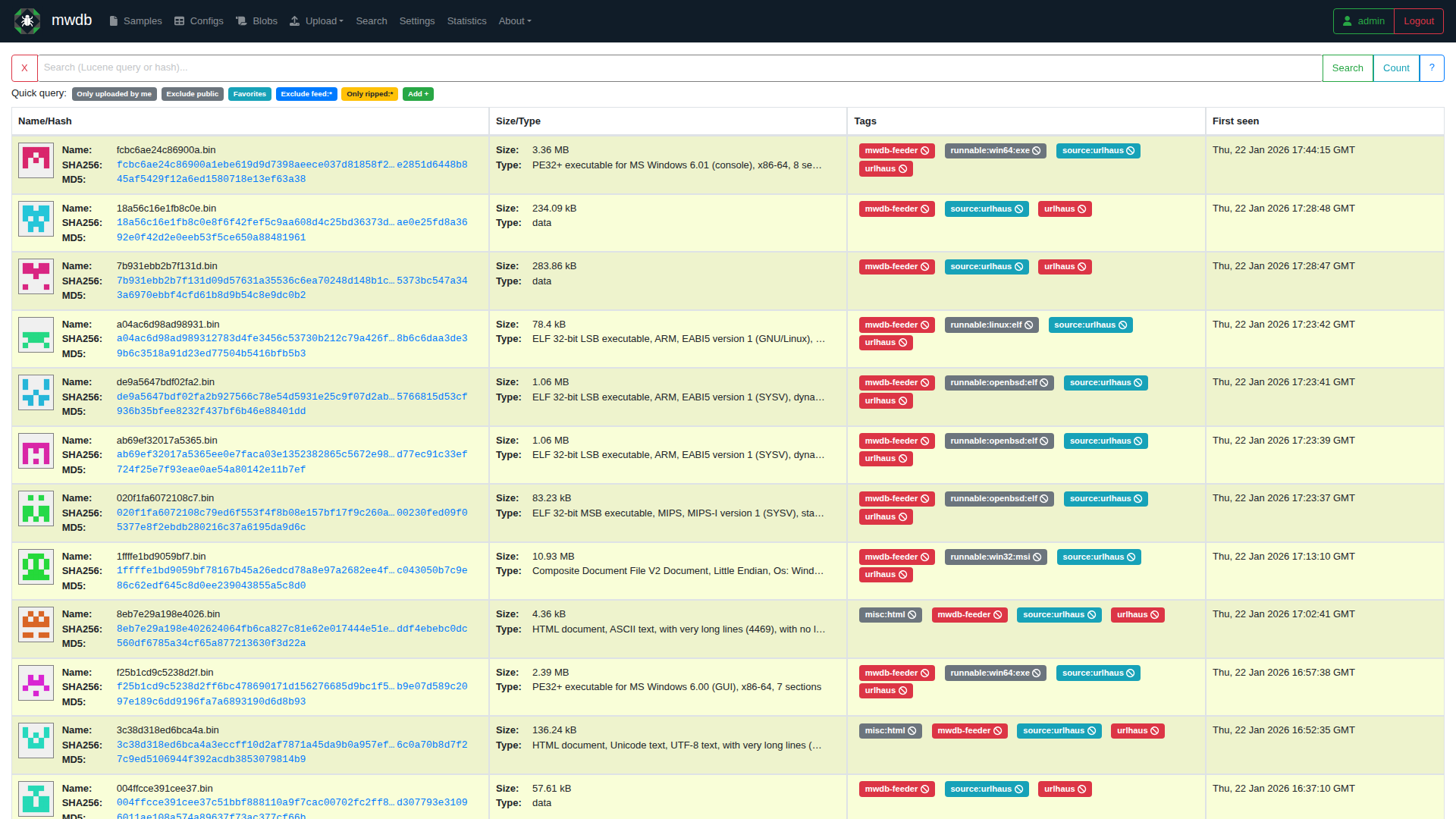
Central malware sample repository with tagging, relationships, and Karton integration.
MWDB Stack Manager (Cockpit)
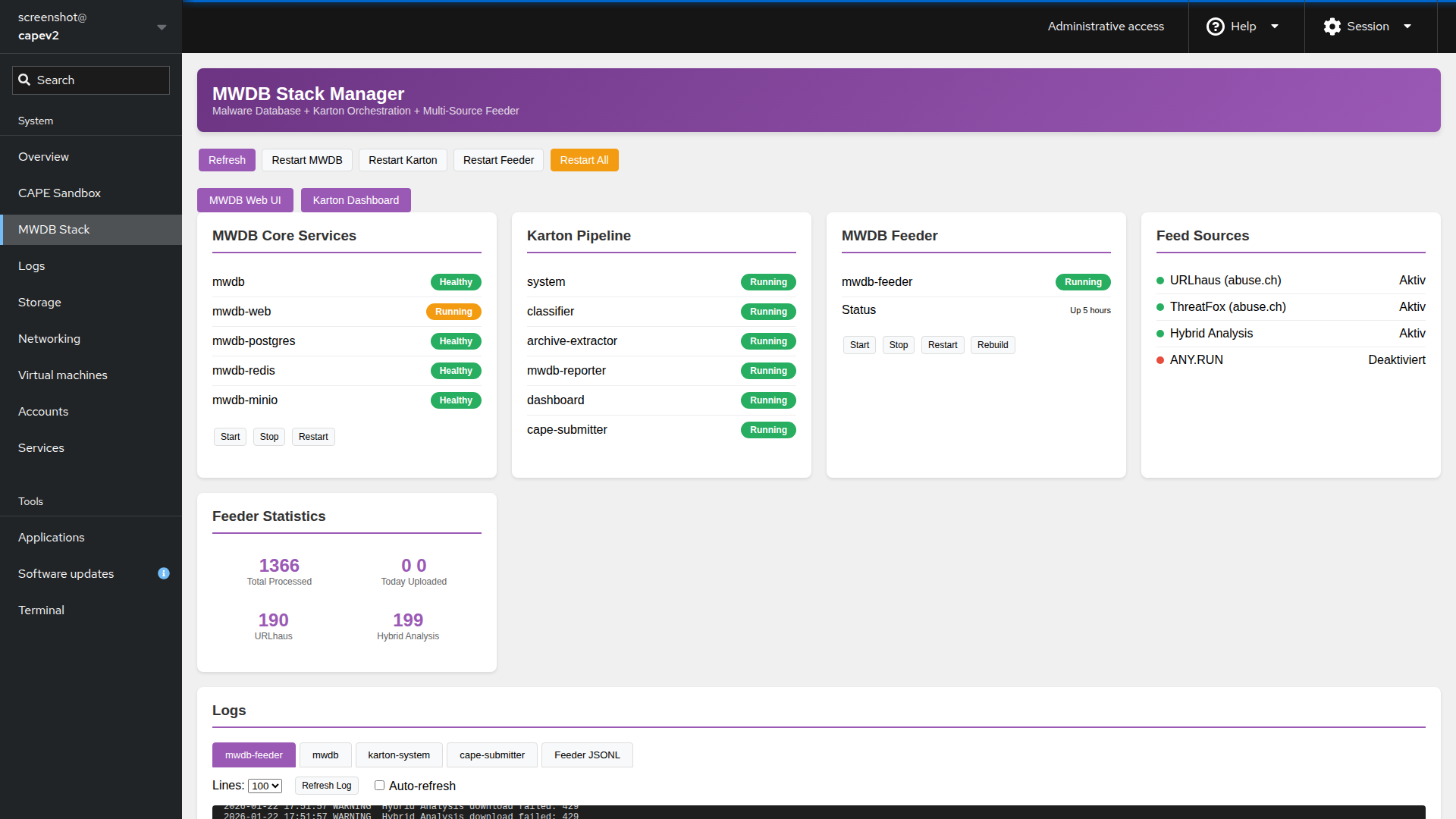
Manage MWDB services, Karton pipeline, and container health from Cockpit.
CAPE Sandbox Manager (Cockpit)
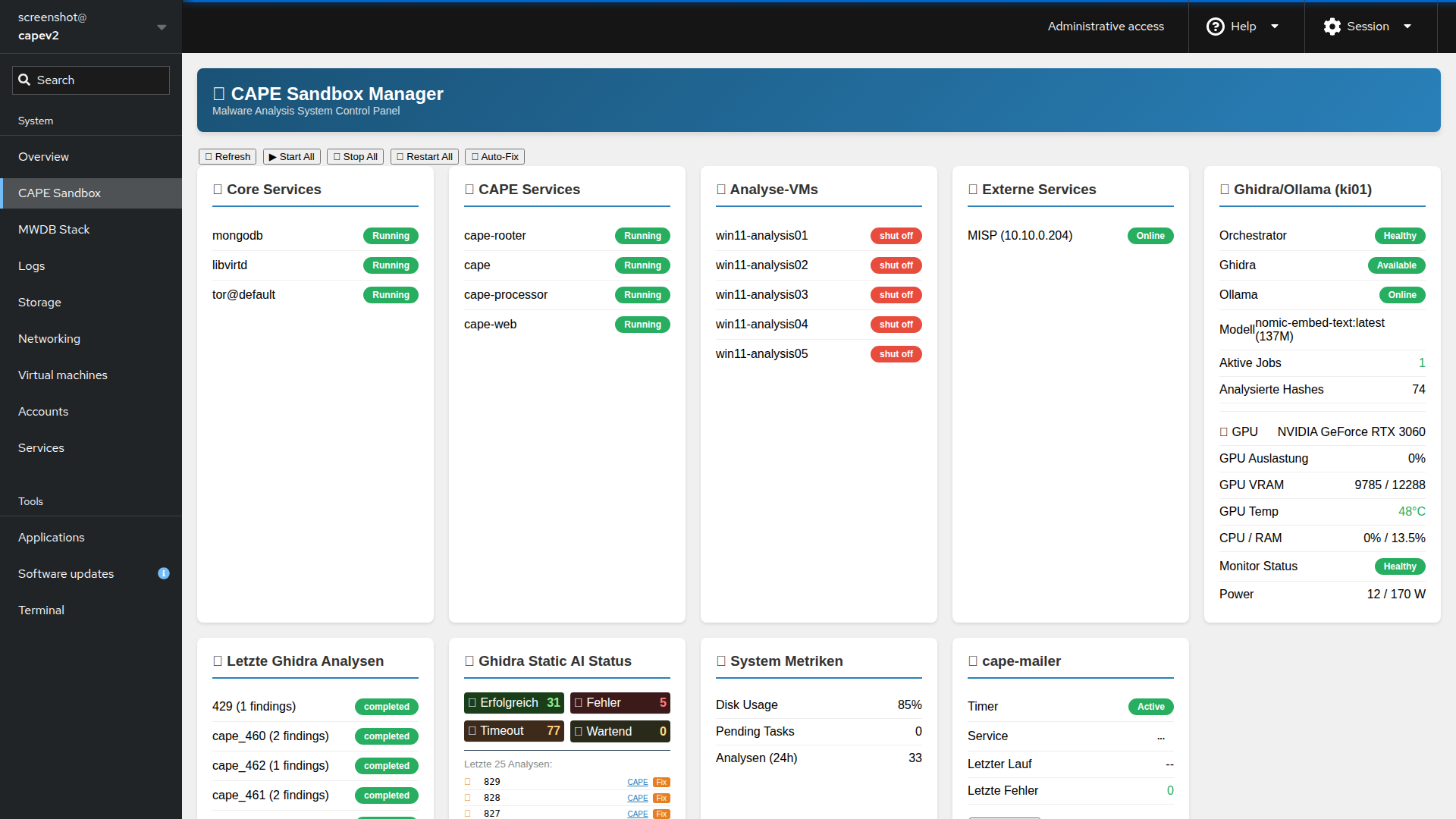
Monitor CAPE services, VMs, and external service connectivity.
License
MIT License with Attribution
Author: Michael Pauli
- GitHub: @icepaule
- Email: **@.*
When using this software, please maintain attribution to the original author.
Contributing
Contributions welcome! Please:
- Fork the relevant component repository
- Create a feature branch
- Submit a pull request
Documentation
Core Guides
- Troubleshooting Guide - Common issues and fixes
- CAPE AI Analysis - AI-enhanced malware analysis system
- AWS Deployment - Cloud deployment guide
- Changelog August 2026 - Recent fixes and improvements
Operational Manuals (German)
Support
- Open an issue in the relevant repository
- Email: **@.*