IcePorge-CAPE-Mailer
CAPE Sandbox Email Integration - Automated malware analysis via email submission
Email-Triggered CAPE Analysis with Automated Response

Betriebshandbuch CAPE Mailer - E-Mail-basierte Malware-Analyse
Dokumenteninformationen
| Attribut | Wert |
|---|---|
| Dokumentenversion | 1.0 |
| Erstellungsdatum | 2026-01-19 |
| Letzte Änderung | 2026-01-19 |
| Klassifizierung | INTERN |
| Zielgruppe | ITSO / Cyber Security Analyst Level 3 |
| Dokumentenverantwortlicher | IT-Sicherheitsbetrieb |
| Review-Zyklus | Quartalsweise |
Inhaltsverzeichnis
- Zweck und Geltungsbereich
- Systemübersicht und Architektur
- Regulatorische Anforderungen
- Installation und Konfiguration
- Betriebsverfahren
- Wartungsverfahren
- Incident Response Prozeduren
- Troubleshooting
- Sicherheitsaspekte
- Anhänge
1. Zweck und Geltungsbereich
1.1 Zweck des Dokuments
Dieses Betriebshandbuch dokumentiert den Betrieb des CAPE Mailers - einer automatisierten E-Mail-Analyse-Pipeline für die Erkennung von Malware und Phishing-Angriffen. Das System ermöglicht Mitarbeitern die unkomplizierte Einreichung verdächtiger E-Mail-Anhänge zur automatisierten Analyse.
1.2 Geltungsbereich
Das Handbuch gilt für:
- Die CAPE Mailer-Installation unter
/opt/cape-mailer/ - Die IMAP/SMTP-Schnittstelle zu
****@****.*** - Alle integrierten OSINT-Dienste (OTX, AbuseIPDB, VirusTotal, Google Safe Browsing)
- Die MISP-Anbindung für Threat Intelligence
1.3 Systemzweck
CAPE Mailer automatisiert den kompletten Workflow der verdächtigen E-Mail-Analyse:
- Eingangsverarbeitung: IMAP-Abruf von
****@****.*** - Klassifizierung: Automatische Erkennung von Malware vs. Phishing
- Analyse: CAPE Sandbox (Malware) oder Multi-Source OSINT (Phishing)
- Bewertung: KI-gestützte Risikobewertung via Ollama LLM
- Reporting: HTML-Report per E-Mail an Einsender
- Threat Intelligence: Automatische MISP-Event-Erstellung
Quelle: /opt/cape-mailer/bin/cape_mailer.py:1-76 (Dokumentation)
2. Systemübersicht und Architektur
2.1 Architektur-Diagramm
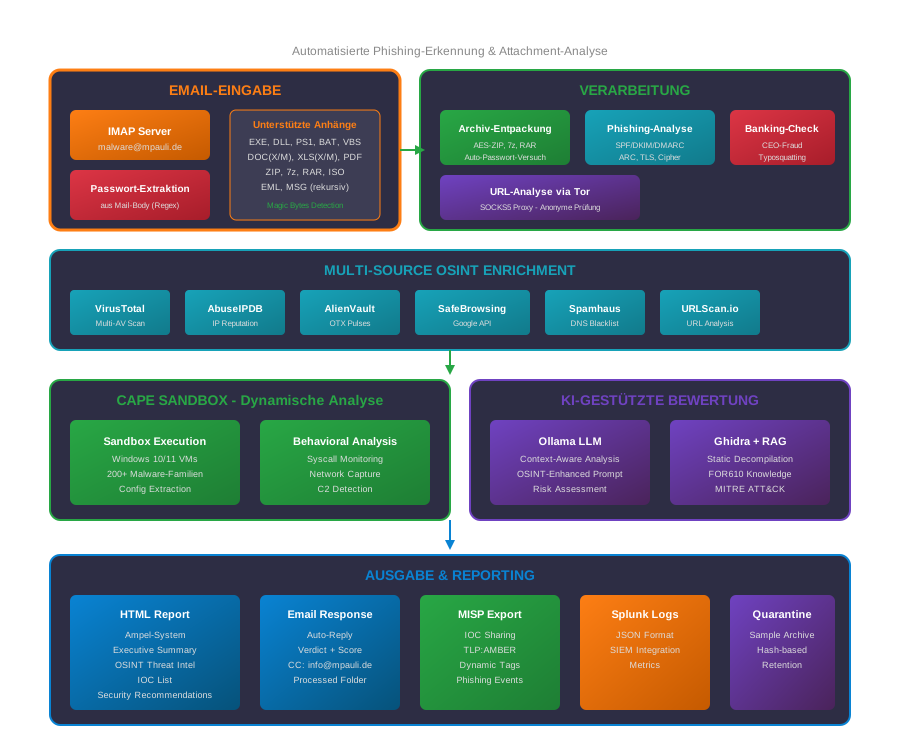
Mermaid-Diagramm (klicken zum Ausklappen)
```mermaid flowchart TB subgraph INPUT["EMAIL-EINGABE"] IMAP[IMAP Server****@****.***] PWD[Passwort-Extraktion
aus Mail-Body] ATTACH[Anhänge
EXE, DLL, ZIP, 7z, RAR
DOC, PDF, EML, MSG] end subgraph PROCESS["VERARBEITUNG"] UNZIP[Archiv-Entpackung
AES-ZIP, 7z, RAR
Auto-Passwort] PHISH[Phishing-Analyse
SPF/DKIM/DMARC
ARC, TLS] BANK[Banking-Check
CEO-Fraud
Typosquatting] URL[URL-Analyse
via Tor Proxy] end subgraph OSINT["MULTI-SOURCE OSINT"] VT[VirusTotal] ABUSE[AbuseIPDB] OTX[AlienVault OTX] SAFE[Google SafeBrowsing] SPAM[Spamhaus] URLSCAN[URLScan.io] end subgraph SANDBOX["CAPE SANDBOX"] EXEC[Sandbox Execution
Windows 10/11 VMs] BEHAV[Behavioral Analysis
200+ Malware-Familien] end subgraph AI["KI-BEWERTUNG"] LLM[Ollama LLM
Context-Aware] RAG[Ghidra + RAG
FOR610 Knowledge] end subgraph OUTPUT["AUSGABE"] HTML[HTML Report
Ampel-System] MAIL[Email Response
Auto-Reply] MISP[MISP Export
IOC Sharing] SPLUNK[Splunk Logs
JSON Format] end INPUT --> PROCESS PWD --> UNZIP PROCESS --> OSINT PROCESS --> SANDBOX OSINT --> AI SANDBOX --> AI AI --> OUTPUT ```
Zentrale Features:
- Email-Eingabe: Automatischer IMAP-Abruf mit Passwort-Extraktion aus dem Mail-Body
- Archiv-Handling: ZIP (AES-verschlüsselt), 7z, RAR mit automatischem Passwort-Versuch
- Phishing-Analyse: Multi-Source Auth-Header-Parsing (SPF/DKIM/DMARC/ARC)
- OSINT-Enrichment: 6+ Threat Intelligence Quellen
- KI-Bewertung: Ollama LLM mit OSINT-Context für präzise Risikobewertung
2.2 Systemkomponenten
| Komponente | Beschreibung | Quelle |
|---|---|---|
| cape_mailer.py | Hauptskript (3459 Zeilen) | /opt/cape-mailer/bin/cape_mailer.py |
| config.yaml | Konfiguration | /opt/cape-mailer/config/config.yaml |
| phishing_prompt.txt | Ollama-Prompt für Phishing-Bewertung | /opt/cape-mailer/config/phishing_prompt.txt |
| cleanup_logs.sh | Log-Bereinigung | /opt/cape-mailer/bin/cleanup_logs.sh |
2.3 Verzeichnisstruktur
/opt/cape-mailer/
├── bin/
│   ├── cape_mailer.py          # Hauptskript
│   └── cleanup_logs.sh         # Log-Cleanup
├── config/
│   ├── config.yaml             # Hauptkonfiguration
│   └── phishing_prompt.txt     # Ollama LLM-Prompt
├── logs/
│   ├── cape_mailer_YYYY-MM-DD.log  # Tägliche Logs
│   └── splunk/                     # JSON-Logs für SIEM
├── reports/                    # HTML-Reports
├── work/                       # Temporäre Arbeitsdateien
├── processed/                  # Verarbeitete Samples
├── quarantine/                 # Quarantäne-Dateien
├── venv/                       # Python Virtual Environment
└── cape-mailer.lock            # Process-Lock-Datei
Quelle: /opt/cape-mailer/bin/cape_mailer.py:135-142
2.4 Analyse-Modi
| Modus | Trigger | Analyse-Schritte |
|---|---|---|
| Malware | Nicht-EML/MSG-Anhänge (.exe, .dll, .pdf, etc.) | CAPE Sandbox → Verhaltensanalyse → Ghidra → Ollama |
| Phishing | EML/MSG-Anhänge | Header-Analyse → OSINT → URL-Check → Ollama |
Quelle: /opt/cape-mailer/bin/cape_mailer.py:150-152 (EML_EXTENSIONS)
3. Regulatorische Anforderungen
3.1 BaFin / MaRisk
| MaRisk-Anforderung | Umsetzung |
|---|---|
| AT 7.2 (IT-Risikomanagement) | Automatisierte Phishing-/Malware-Erkennung |
| AT 8.2 (Auslagerung) | OSINT-APIs als externe Dienste dokumentiert |
| BT 3.2 (Überwachung) | Vollständige Protokollierung (Splunk JSON) |
3.2 BAIT (Bankaufsichtliche Anforderungen an die IT)
| BAIT-Kapitel | Relevanz | Maßnahme |
|---|---|---|
| IV. Informationssicherheit | Bedrohungserkennung | Multi-Source Threat Intelligence |
| VI. IT-Betrieb | Automatisierung | Vollautomatische Analyse-Pipeline |
| VIII. Outsourcing | API-Dienste | Dokumentierte OSINT-Anbieter |
3.3 DORA (Digital Operational Resilience Act)
| DORA-Artikel | Anforderung | Umsetzung |
|---|---|---|
| Art. 5 | IKT-Risikomanagement | Automatisierte Bedrohungsanalyse |
| Art. 8 | Erkennung | Real-time Phishing-Detection |
| Art. 11 | Incident Response | MISP-Integration für Threat Sharing |
3.4 ISO 27001 Kontrollen
| ISO 27001 Control | Umsetzung |
|---|---|
| A.7.2.2 Awareness | Mitarbeiter können verdächtige E-Mails einfach einreichen |
| A.12.2 Schutz vor Malware | Automatisierte Analyse-Pipeline |
| A.16.1.4 Incident Assessment | Automatische Risikobewertung (Ampel-System) |
4. Installation und Konfiguration
4.1 Systemvoraussetzungen
Hardware:
- CPU: 2 Kerne (für OSINT-Parallelverarbeitung)
- RAM: 4 GB
- Storage: 50 GB (für Reports und Logs)
Software:
- Python 3.12 mit Virtual Environment
- Zugang zu IMAP/SMTP-Server
- Tor-Proxy (für sichere URL-Prüfung)
4.2 Hauptkonfiguration
Die Konfiguration erfolgt in /opt/cape-mailer/config/config.yaml:
IMAP-Konfiguration (Zeile 8-16):
imap:
  host: "10.1.1.11"
  port: 143
  ssl: false
  starttls: true
  verify_ssl: false
  user: "****@****.***"
  pass: "****
  folder: "INBOX"
SMTP-Konfiguration (Zeile 21-29):
smtp:
  host: "10.1.1.11"
  port: 25
  ssl: false
  starttls: true
  verify_ssl: false
  user: "****@****.***"
  pass: "****
  from: "CAPE Sandbox <****@****.***>"
Quelle: /opt/cape-mailer/config/config.yaml:8-29
4.3 Ampel-System
Das Ampel-System klassifiziert Bedrohungen anhand des Malscores:
# /opt/cape-mailer/config/config.yaml:86-88
ampel:
  green_max_malscore: 1.9    # 🟢 CLEAN: 0-1.9
  yellow_max_malscore: 4.9   # 🟡 VERDÄCHTIG: 2.0-4.9
                              # 🔴 MALICIOUS: 5.0+
| Ampel | Malscore | Bedeutung | Aktion |
|---|---|---|---|
| 🟢 GRÜN | 0-1.9 | Unverdächtig | Informativ |
| 🟡 GELB | 2.0-4.9 | Verdächtig | Manuelle Prüfung empfohlen |
| 🔴 ROT | 5.0+ | Malicious | MISP-Event + Eskalation |
4.4 OSINT-Integration
CAPE Mailer nutzt mehrere OSINT-Quellen für umfassende Threat Intelligence:
# /opt/cape-mailer/config/config.yaml:123-172
osint:
  # AlienVault OTX - Threat Intelligence
  otx:
    enabled: true
    api_key: "<MASKED_OTX_KEY>"
    timeout: 10

  # AbuseIPDB - IP Reputation
  abuseipdb:
    enabled: true
    api_key: "<MASKED_ABUSEIPDB_KEY>"
    timeout: 10
    max_age_days: 90

  # VirusTotal - Multi-Engine Scanner
  virustotal:
    enabled: true
    api_key: "<MASKED_VIRUSTOTAL_KEY>"
    timeout: 15

  # Google Safe Browsing
  google_safe_browsing:
    enabled: true
    api_key: "<MASKED_GOOGLE_SAFEBROWSING_KEY>"
    timeout: 10

  # Spamhaus (DNS-basiert, kostenlos)
  spamhaus:
    enabled: true
Quelle: /opt/cape-mailer/config/config.yaml:123-172
4.5 MISP-Integration
Automatische Event-Erstellung bei kritischen Findings:
# /opt/cape-mailer/config/config.yaml:176-208
misp:
  enabled: true
  url: "https://10.10.0.204"
  api_key: "<MASKED_MISP_KEY>"
  verify_ssl: false

  # Event Settings
  publish: false          # Manuelles Review erforderlich!
  distribution: 0         # Your organization only
  threat_level_id: 4      # 1=High, 2=Medium, 3=Low, 4=Undefined

  # IOC Export
  export_hashes: true
  export_urls: true
  export_domains: true
  export_ips: true
  export_registry_keys: true
  export_mutexes: true
Phishing-spezifische MISP-Trigger (Zeile 210-258):
misp_phishing:
  trigger:
    min_verdict: "suspicious"     # Ab "suspicious" Event erstellen
    min_risk_score: 40            # Oder ab Risk Score 40
    ollama_keywords:              # Oder wenn Ollama diese Keywords nutzt
      - "high"
      - "critical"
      - "phishing"
      - "credential theft"
Quelle: /opt/cape-mailer/config/config.yaml:176-258
5. Betriebsverfahren
5.1 Automatischer Betrieb
CAPE Mailer läuft automatisch via Systemd-Timer:
Timer-Konfiguration (/etc/systemd/system/cape-mailer.timer):
[Timer]
OnBootSec=45s           # Erster Start 45s nach Boot
OnUnitActiveSec=60s     # Dann alle 60 Sekunden
Persistent=true
Service-Konfiguration (/etc/systemd/system/cape-mailer.service):
[Service]
Type=oneshot
User=cape
Group=cape
WorkingDirectory=/opt/cape-mailer
ExecStart=/opt/cape-mailer/venv/bin/python3 /opt/cape-mailer/bin/cape_mailer.py

# Hardening
NoNewPrivileges=true
PrivateTmp=true
ProtectSystem=strict
ProtectHome=true
Quelle: /etc/systemd/system/cape-mailer.service
5.2 Service-Management
# Timer starten
sudo systemctl start cape-mailer.timer

# Timer stoppen
sudo systemctl stop cape-mailer.timer

# Timer-Status prüfen
systemctl status cape-mailer.timer

# Manueller Einzellauf
sudo systemctl start cape-mailer.service

# Logs anzeigen
journalctl -u cape-mailer -f
5.3 E-Mail-Einreichung durch Mitarbeiter
Vorgehensweise für Mitarbeiter:
- Verdächtige E-Mail als
.emloder.msgspeichern (oder Anhang extrahieren) - Neue E-Mail an
****@****.***erstellen - Verdächtige Datei anhängen
- Optional: Passwort für verschlüsselte Archive im Text angeben
- Format:
Passwort: infectedoder `Password: **
- Format:
- E-Mail absenden
- Automatischer Report innerhalb von ~5-30 Minuten
Unterstützte Dateitypen (/opt/cape-mailer/config/config.yaml:34-61):
- Ausführbare Dateien:
.exe,.dll,.msi - Skripte:
.ps1,.js,.vbs,.bat,.cmd - Dokumente:
.pdf,.doc(x/m),.xls(x/m),.ppt(x/m) - Archive:
.zip,.7z,.rar,.iso - E-Mails:
.eml,.msg
5.4 Mailbox-Verwaltung
Verarbeitete E-Mails werden automatisch verwaltet:
| Status | Aktion | Zielordner |
|---|---|---|
| Erfolgreich analysiert | Verschieben | Processed |
| Fehler bei Analyse | Markieren als gelesen | INBOX (markiert) |
| Loop-Detection | Ignorieren | - |
Loop-Prevention: E-Mails von ****@****.*** werden nicht beantwortet (verhindert E-Mail-Loops).
Quelle: /opt/cape-mailer/bin/cape_mailer.py:63 (Changelog v2.3.1)
5.5 Report-Interpretation
Der HTML-Report enthält folgende Sektionen:
Malware-Report:
- Executive Summary (Ampel-Bewertung)
- KI-Analyse (Ollama LLM)
- MITRE ATT&CK Mapping
- OTX Threat Intelligence
- Behavioral Sequence
- Ghidra Static Analysis
- OSINT Reputation
Phishing-Report:
- Risikobewertung (0-100)
- Header-Analyse (SPF/DKIM/DMARC)
- Mail-Routing-Chain (TLS-Verschlüsselung)
- URL-Analyse mit OSINT-Reputation
- Banking-spezifische Checks (Typosquatting, CEO-Fraud)
- KI-Bewertung mit Empfehlungen
6. Wartungsverfahren
6.1 Log-Rotation
Die Logs werden täglich rotiert und komprimiert:
Cleanup-Skript (/opt/cape-mailer/bin/cleanup_logs.sh):
#!/bin/bash
LOG_DIR="/opt/cape-mailer/logs"
RETENTION_DAYS=180

# Komprimieren nach 1 Tag
find "$LOG_DIR" -name "cape_mailer_*.log" -type f -mtime +1 ! -name "*.gz" -exec gzip -9 {} \;

# Löschen nach 180 Tagen
find "$LOG_DIR" -name "cape_mailer_*.log.gz" -type f -mtime +$RETENTION_DAYS -delete

# Splunk JSON-Logs
find "$LOG_DIR/splunk" -name "*.json" -type f -mtime +1 ! -name "*.gz" -exec gzip -9 {} \;
find "$LOG_DIR/splunk" -name "*.json.gz" -type f -mtime +$RETENTION_DAYS -delete
Cron-Job (/etc/cron.daily/cape-log-cleanup):
#!/bin/bash
/opt/cape-mailer/bin/cleanup_logs.sh >> /var/log/cape-log-cleanup.log 2>&1
Aufbewahrung: 180 Tage (6 Monate)
Quelle: /opt/cape-mailer/bin/cleanup_logs.sh
6.2 OSINT-API-Keys
Die API-Keys sollten regelmäßig auf Gültigkeit geprüft werden:
| Service | API-Key-Standort | Erneuerung |
|---|---|---|
| OTX | config.yaml:128 | Unbegrenzt (kostenlos) |
| AbuseIPDB | config.yaml:135 | Jährlich prüfen |
| VirusTotal | config.yaml:143 | Rate-Limits beachten |
| Google Safe Browsing | config.yaml:157 | Google Cloud Console |
API-Key-Test:
# OTX Test
curl -H "X-OTX-API-KEY: <key>" "https://otx.alienvault.com/api/v1/user/me"

# VirusTotal Test
curl -H "x-apikey: <key>" "https://www.virustotal.com/api/v3/users/current"
6.3 Python-Dependency-Updates
# Virtual Environment aktivieren
source /opt/cape-mailer/venv/bin/activate

# Aktuelle Dependencies anzeigen
pip list --outdated

# Security-Updates
pip install --upgrade requests urllib3 pyopenssl

# Nach Update: Service-Test
/opt/cape-mailer/venv/bin/python3 -c "import cape_mailer; print('OK')"
7. Incident Response Prozeduren
7.1 Phishing-Kampagne erkannt
Indikatoren:
- Mehrere ähnliche E-Mails von verschiedenen Mitarbeitern
- MISP-Events mit gleichen IOCs
- Splunk-Alert bei gehäuften ROT-Bewertungen
Sofortmaßnahmen:
- MISP-Events konsolidieren:
# Alle Phishing-Events der letzten 24h curl -k -H "Authorization: <api_key>" \ "https://10.10.0.204/events/restSearch" \ -d '{"tags":["phishing"],"from":"1d"}' - IOCs an Mail-Gateway exportieren:
- Sender-Domains blocken
- URLs in Web-Proxy sperren
- Betroffene Mitarbeiter informieren
- Awareness-Maßnahme:
- Phishing-Report an betroffene Abteilungen
- ggf. Test-Phishing zur Sensibilisierung
7.2 Malware-Ausbruch
Bei ROT-Bewertung mit hohem Malscore (>8):
- CAPE-Report analysieren:
# Report öffnen firefox /opt/cape-mailer/reports/cape_<hash>.html - IOCs aus MISP extrahieren:
- Hashes für EDR-Suche
- C2-Domains für Proxy-Block
- Registry-Keys für Forensik
- Eskalation:
- CERT-Team informieren
- Betroffene Systeme isolieren
- Forensik einleiten
7.3 Service-Ausfall
Symptome: Keine Reports, Timer läuft nicht
Diagnose:
# Timer-Status
systemctl status cape-mailer.timer

# Letzte Ausführungen
journalctl -u cape-mailer --since "1 hour ago"

# Lock-File prüfen
ls -la /opt/cape-mailer/cape-mailer.lock
cat /opt/cape-mailer/cape-mailer.lock  # Zeigt PID

# Prozess prüfen (falls Lock existiert)
ps aux | grep cape_mailer
Behebung:
# Bei verwaister Lock-Datei
rm /opt/cape-mailer/cape-mailer.lock

# Timer neu starten
sudo systemctl restart cape-mailer.timer
8. Troubleshooting
8.1 Häufige Fehler
| Fehler | Ursache | Lösung |
|---|---|---|
Lock file exists | Vorheriger Prozess läuft noch | Warten oder Lock-Datei manuell entfernen |
IMAP connection failed | Netzwerk/Auth-Problem | Credentials in config.yaml prüfen |
CAPE API timeout | CAPE-Überlastung | max_wait in config.yaml erhöhen |
OSINT rate limit | API-Limits erreicht | Wartezeit erhöhen oder API-Key upgraden |
Ollama timeout | LLM-Server überlastet | timeout in config.yaml erhöhen |
8.2 Log-Analyse
# Heutiges Log
tail -f /opt/cape-mailer/logs/cape_mailer_$(date +%Y-%m-%d).log

# Fehler suchen
grep -i "error\|exception\|failed" /opt/cape-mailer/logs/cape_mailer_*.log

# Spezifische Mail-ID suchen
grep "Mail #123" /opt/cape-mailer/logs/cape_mailer_*.log
8.3 IMAP-Verbindungstest
# Python-Test
/opt/cape-mailer/venv/bin/python3 << 'EOF'
from imapclient import IMAPClient
with IMAPClient('10.1.1.11', port=143, ssl=False) as c:
    c.starttls()
    c.login('****@****.***', 'onlyinfected')
    print("Verbindung erfolgreich!")
    print(f"Mails in INBOX: {c.select_folder('INBOX')}")
EOF
8.4 Manueller Testlauf
# Mit Debug-Output
cd /opt/cape-mailer
/opt/cape-mailer/venv/bin/python3 /opt/cape-mailer/bin/cape_mailer.py 2>&1 | tee /tmp/cape_mailer_debug.log
9. Sicherheitsaspekte
9.1 Systemd-Hardening
Der Service läuft mit restriktiven Berechtigungen:
# /etc/systemd/system/cape-mailer.service
NoNewPrivileges=true       # Keine Privilege Escalation
PrivateTmp=true            # Isoliertes /tmp
ProtectSystem=strict       # Nur explizit erlaubte Pfade schreibbar
ProtectHome=true           # Kein Zugriff auf /home
ReadWritePaths=/opt/cape-mailer /opt/CAPEv2/storage /opt/CAPEv2/log /opt/CAPEv2/conf
RestrictAddressFamilies=AF_INET AF_INET6 AF_UNIX
LockPersonality=true       # Keine Personality-Änderung
Quelle: /etc/systemd/system/cape-mailer.service
9.2 Credential-Management
| Credential | Speicherort | Schutzmechanismus |
|---|---|---|
| IMAP-Passwort | config.yaml | Dateiberechtigungen (640) |
| SMTP-Passwort | config.yaml | Dateiberechtigungen (640) |
| MISP-API-Key | config.yaml | TLS-Verschlüsselung |
| OSINT-API-Keys | config.yaml | Rate-Limiting |
Empfehlung: Für Produktivbetrieb HashiCorp Vault oder ähnliche Secret-Management-Lösung implementieren.
9.3 Netzwerk-Sicherheit
| Verbindung | Protokoll | Verschlüsselung |
|---|---|---|
| IMAP (10.1.1.11) | STARTTLS | TLS 1.2+ |
| SMTP (10.1.1.11) | STARTTLS | TLS 1.2+ |
| MISP (10.10.0.204) | HTTPS | TLS 1.2+ |
| Ollama (10.10.0.113) | HTTP | Intern (kein TLS) |
| OSINT-APIs | HTTPS | TLS 1.2+ |
| URL-Checks | Tor SOCKS5 | Anonymisiert |
9.4 Tor-Proxy für URL-Prüfung
URLs werden über Tor geprüft, um die IP des Analysten zu schützen:
# /opt/cape-mailer/bin/cape_mailer.py:148
TOR_PROXY = "socks5h://127.0.0.1:9050"
10. Anhänge
10.1 Konfigurationsdateien-Referenz
| Datei | Zweck |
|---|---|
/opt/cape-mailer/config/config.yaml | Hauptkonfiguration |
/opt/cape-mailer/config/phishing_prompt.txt | Ollama-Prompt für Phishing-Bewertung |
/etc/systemd/system/cape-mailer.service | Systemd-Service |
/etc/systemd/system/cape-mailer.timer | Timer (60s Intervall) |
/etc/cron.daily/cape-log-cleanup | Log-Bereinigung |
/etc/logrotate.d/opt-logs | Logrotate-Konfiguration |
10.2 Kommandoreferenz
# Service-Management
systemctl {start|stop|restart|status} cape-mailer.timer
systemctl {start|stop|restart|status} cape-mailer.service

# Logs
tail -f /opt/cape-mailer/logs/cape_mailer_$(date +%Y-%m-%d).log
journalctl -u cape-mailer -f

# Lock-Management
cat /opt/cape-mailer/cape-mailer.lock    # PID anzeigen
rm /opt/cape-mailer/cape-mailer.lock     # Lock entfernen (Vorsicht!)

# Manueller Test
/opt/cape-mailer/venv/bin/python3 /opt/cape-mailer/bin/cape_mailer.py
10.3 Banking-spezifische Checks
CAPE Mailer erkennt Banking-bezogene Phishing-Versuche:
Deutsche Banken-Keywords (/opt/cape-mailer/bin/cape_mailer.py:166-171):
GERMAN_BANKS = [
    "sparkasse", "volksbank", "raiffeisenbank", "commerzbank", "deutsche bank",
    "postbank", "ing-diba", "ing", "dkb", "comdirect", "hypovereinsbank", "unicredit",
    "targobank", "santander", "n26", "bunq", "consorsbank", "norisbank", "sparda",
    "apobank", "psd bank", "bw bank", "lbbw", "helaba", "landesbank", "kfw"
]
CEO-Fraud-Keywords (/opt/cape-mailer/bin/cape_mailer.py:174-179):
CEO_FRAUD_KEYWORDS = [
    "dringend", "vertraulich", "geheim", "überweisung", "wire transfer",
    "geschäftsführer", "ceo", "vorstand", "chef", "direktor",
    "sofort", "immediately", "urgent", "asap", "zeitkritisch",
    "nicht weiterleiten", "nur für sie", "persönlich"
]
10.4 Kontaktinformationen
| Rolle | Kontakt |
|---|---|
| IT-Sicherheitsbetrieb (1st Level) | **@.* |
| CERT/Incident Response (2nd Level) | **@.* |
| System-Administration (3rd Level) | **@.* |
| Malware-Analyse-Mailbox | **@.* |
10.5 Änderungshistorie
| Version | Datum | Autor | Änderung |
|---|---|---|---|
| 1.2 | 2026-01-23 | IcePorge | SVG-Architekturdiagramm, Mermaid-Diagramm, TruffleHog Security-Scan Integration |
| 1.1 | 2026-01-22 | IcePorge | Secret-Maskierung für GitHub-Push, Git-History-Bereinigung |
| 1.0 | 2026-01-19 | IT-Sicherheit | Initiale Erstellung |
Ende des Dokuments
Dieses Dokument unterliegt der Klassifizierung INTERN und darf nur innerhalb des Instituts verwendet werden.